A field-record workflow for Washington BATs
How to complete a Washington backflow test report in the field
Record the facility and assembly identity before testing, enter each observed reading exactly as measured, document repairs and retest results, then verify kit and tester details before finalizing. Afterward, compare the record with the water purveyor’s current form and submission requirements.
A field notebook does not replace the approved test procedure, tester certification, required signature, or a water purveyor’s own report and submission process.
Offline field records for Washington BATs
01 / Confirm the destination first
Know which report the water purveyor accepts
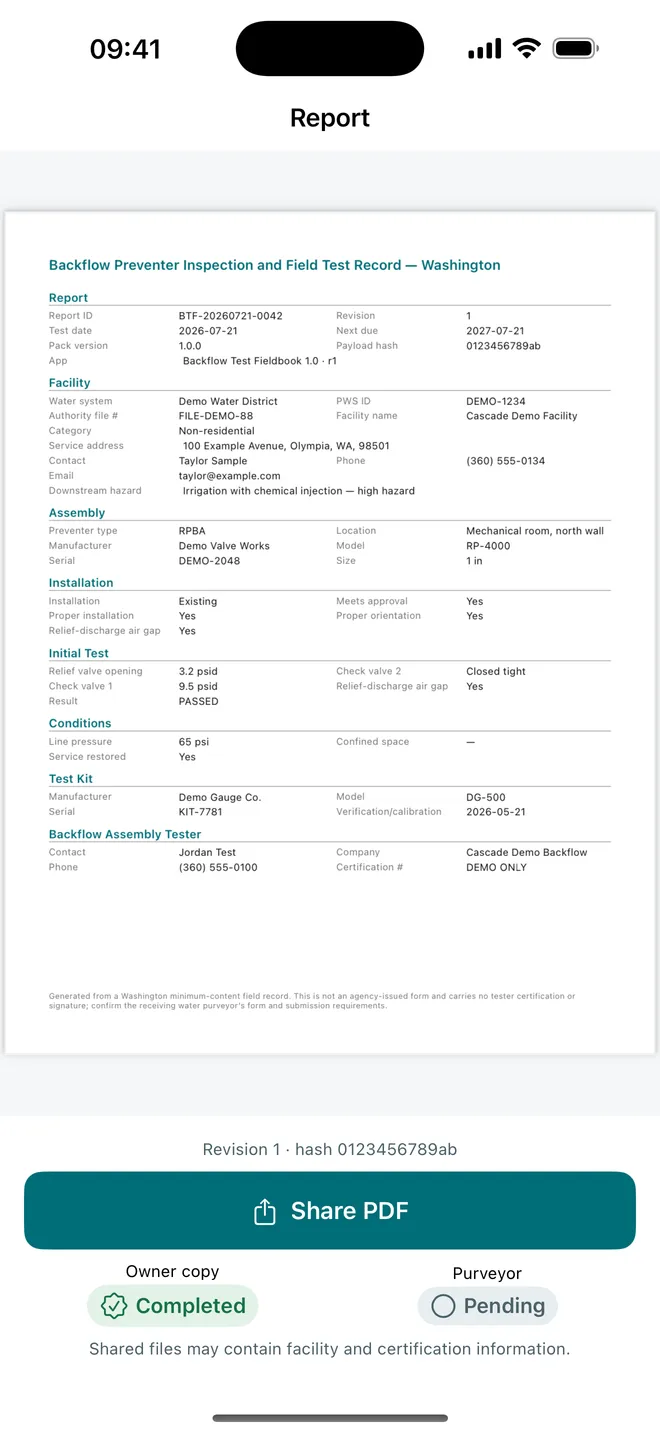
Washington Administrative Code 246-292-036 lists minimum information for backflow assembly test reports. It covers the facility, assembly and installation, test data, repairs, test kit, remarks, and the certified backflow assembly tester. A water purveyor can provide a specific form and instructions for receiving that information.
Before the appointment, identify the purveyor, obtain its current form or portal instructions, and check the submission deadline. Confirm whether it wants the original form, an uploaded PDF, an online entry, or another delivery method. Also confirm any local account, device, hazard, or owner identifiers that must appear exactly.
Pre-visit record check
- Water purveyor and current reporting instructions
- Facility name, address, contact, and account identifiers
- Assembly type, make, model, size, serial number, and location
- Installation purpose and orientation details required by the form
- Tester certification and test-kit information
- Submission method, signature requirement, and due date
Reference: Washington State Department of Health’s field-test-report page and the current text of WAC 246-292-036. Always check for updates and local requirements.
02 / Record facts as you go
A practical field workflow
- Identify the site and assembly
Match the assembly serial number and physical location before entering readings. A familiar address can contain several devices.
- Choose the correct assembly type
Record the device category used by the job, such as DCVA, RPBA, PVBA, air gap, or another applicable type. Follow the approved procedure for that assembly.
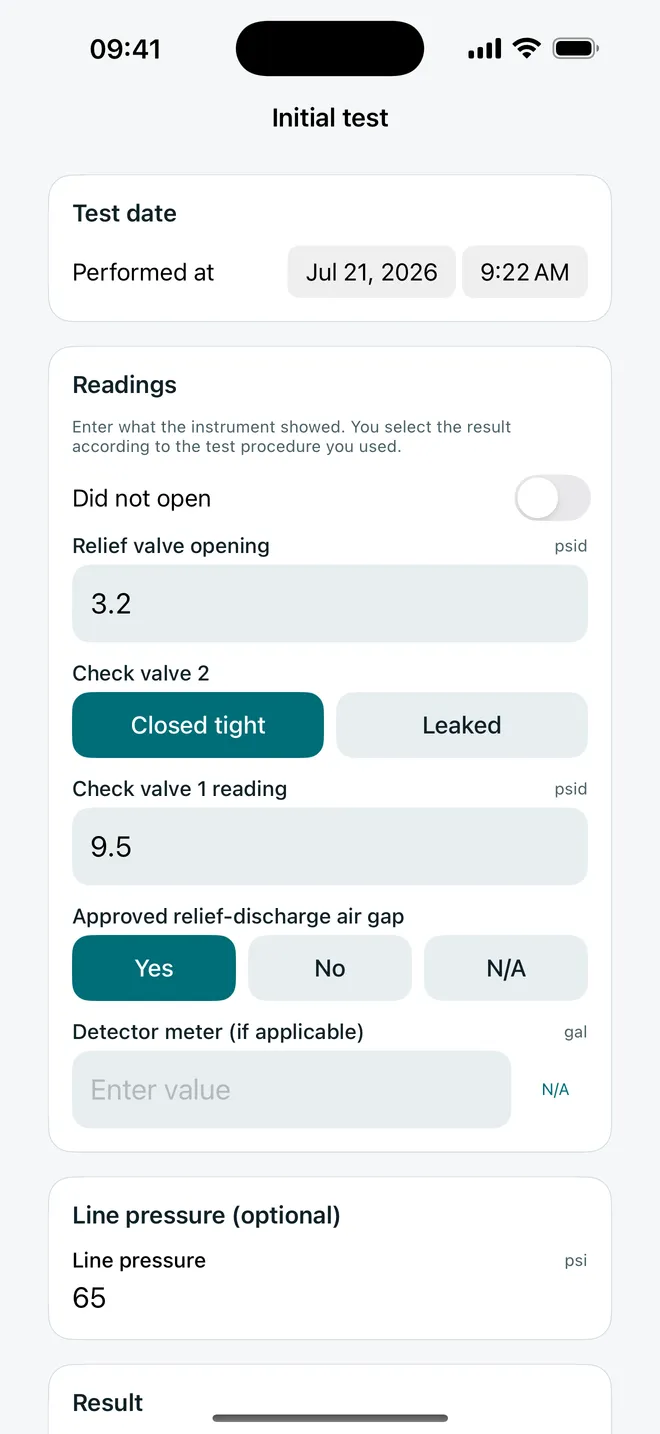
- Enter initial readings exactly
Preserve the decimals shown by the calibrated test kit. The tester applies the required method and decides the result; the record should reflect that decision without silently changing the measurements.
- Document maintenance or repair
If work is performed, record the relevant maintenance and parts, then keep the after-repair test readings separate from the initial test.
- Add kit and tester details
Confirm test-kit identity and calibration information plus the tester name, certification number, and certification expiration required for the record.
- Review before finalizing
Resolve missing fields while the assembly, paperwork, and contacts are still available. Add useful remarks when the form or conditions call for them.
03 / Review before the details scatter
Check identity, readings, and required credentials
Start the final review at the top of the record. Make sure the facility and assembly belong together, the serial number matches the device, and the assembly type matches the test section. Compare every reading with the tester’s notes, and confirm that initial and after-repair results appear in the correct place.
Site and assembly
Correct owner or facility, service address, location, make, model, size, serial number, and installation details.
Test and repair
Initial readings, tester-selected result, maintenance or parts, after-repair readings, and explanatory remarks.
Kit and tester
Test-kit identification and calibration data plus the BAT’s current certification details.
Record integrity
A finalized copy that preserves what was entered, with revisions or later amendments kept traceable.
Good field records reduce the need to reconstruct an appointment later. They also make it easier to transfer the information into a purveyor-specific form without guessing which reading belonged to which check valve or whether a value came from the initial or final test.
04 / Finish the reporting step
Turn the field record into the required submission
A clean PDF is useful for company records, the customer, and reporting preparation, but it is not automatically the form every Washington purveyor accepts. Open the purveyor’s current instructions, compare every required field, and transfer or attach the information as directed.
Complete any tester certification statement and signature required outside the app. Submit through the accepted channel, keep evidence of delivery when your business process requires it, and retain records according to the applicable rule, contract, and company policy. Due-date reminders can help organize return work, but the agreed date and the purveyor’s compliance deadline should be recorded deliberately rather than inferred.
Built for the field
Backflow Test Fieldbook keeps the visit in one offline workflow
Use a six-step, autosaving record for common assembly types. Reuse facility and assembly identity without copying old readings, check missing information, preserve initial and after-repair entries, create a US Letter PDF, and keep a searchable local history.
- Offline autosave
- Washington-focused fields
- Typed decimal preservation
- Initial and after-repair tests
- PDF field record
- Due-date reminders
Offline field records for Washington BATs

Your field record stays local until you choose to share it.
Frequently asked questions
Washington backflow test report FAQ
What information belongs in a Washington backflow test report?
Washington’s rule identifies facility, assembly, installation, test-reading, repair, test-kit, remarks, and backflow assembly tester information among the required report content. The water purveyor may require its own form, fields, delivery method, and deadline.
Can I submit a Backflow Test Fieldbook PDF directly to every water purveyor?
Do not assume so. The app creates an independent field record and does not submit it. Compare the completed record with the purveyor’s current form and instructions, transfer information when required, add signatures or certification statements outside the app, and submit through the accepted channel.
Does the app decide whether an assembly passes?
No. The certified tester performs the approved field test and selects the result. The app records the tester’s readings and decision; it does not supply a procedure, threshold, diagnosis, or automatic pass/fail determination.
Can I reuse a previous assembly record?
You can reuse site and assembly identity to reduce retyping. Previous readings and test outcomes are not copied into a new test, so each visit starts with fresh measurement fields.
Does Backflow Test Fieldbook work without a connection?
Yes. Records are stored locally and the field workflow works offline. The app does not create an agency account or submit records to a purveyor.
Backflow Test Fieldbook is an independent recordkeeping tool. It is not an agency form, does not teach the test procedure, does not determine pass or fail, does not capture the tester certification signature, and does not submit a report. Follow current Washington rules, approved procedures, and each water purveyor’s instructions.