
Neobile LLC · iOS 17.0 or later
ABA Data Collection: RBT & SLP
ABA Data Collection: RBT & SLP is an offline session data app for RBTs, SLPAs and behavior technicians. Record frequency, duration, latency, percent correct and three interval methods with large buttons; records stay encrypted on the device. Free to download; client setups, per-client progress charts and progress reports need an in-app purchase.
No account · records encrypted on your device
Current version 1.1 · October 6, 2026
Inside the app
Who is it for?
- RBTs and behavior technicians working in homes, schools, early intervention and clinics
- SLPAs who score correct and incorrect trials and report percentages to their SLP
- Practitioners who need data without Wi-Fi and without an account
- Anyone who must hand a supervisor one clear report per client
What does it do?
Seven measurement methods, several targets at once
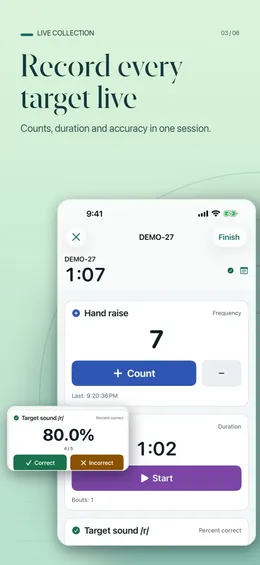
- Frequency count with time-stamped events
- Duration with multiple start/stop bouts
- Latency from cue to response
- Percent correct with correct and incorrect opportunities
- Whole interval, partial interval and momentary time sampling on one shared cadence (5 seconds to 60 minutes)
- Up to 24 targets in one session, large buttons, undo and corrections during collection
- Automatic recovery of an active session if you are interrupted
Client progress and reports
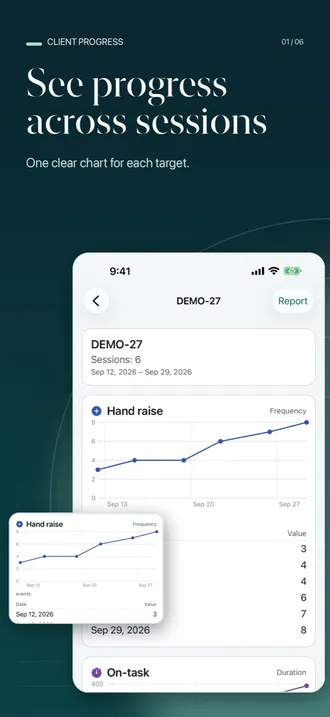
- A progress chart for each client, built from the sessions you recorded
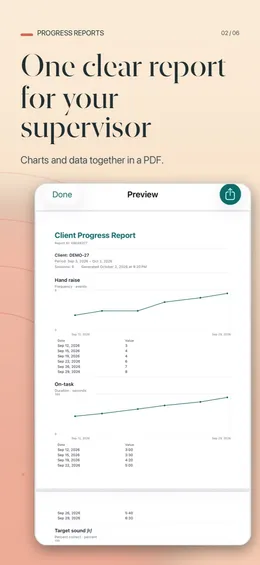
- One PDF or CSV report per client for the last 7 days, the last 30 days or all sessions
- Percentages always shown with their numerator and denominator
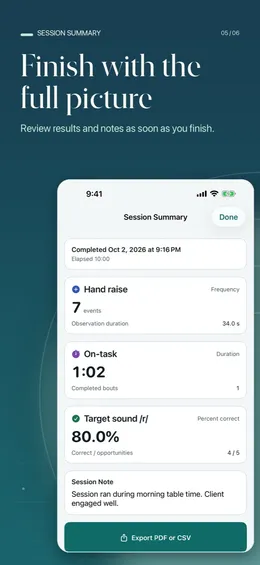
- A session summary with notes as soon as you finish, with PDF or CSV export
Start each client in one tap
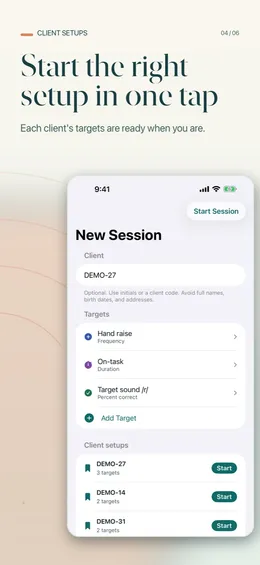
- Save a client setup with the client ID, targets and interval cadence
- Tap Start next to a client and collect right away, or repeat your last setup
Private by design
- No account and no internet connection needed
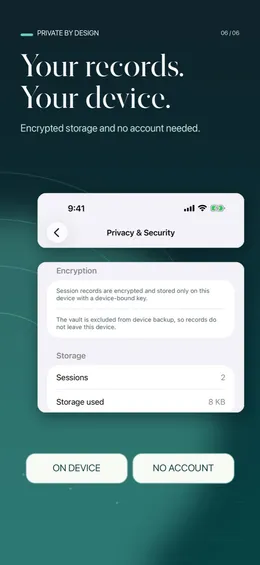
- Records encrypted and stored only on the device, excluded from device backup
- Privacy-safe exports by default: no client ID, generic target names
- Optional app lock with Face ID, Touch ID or the device passcode; app-switcher and screen-capture shields
What makes it different?
Works with no connection
Everything runs on the iPhone or iPad. There is no account, no cloud sync, no ads and no analytics, and the App Store privacy label reads “Data Not Collected”.
Numbers you can check
Percent correct is correct ÷ (correct + incorrect) × 100 and shows both counts. Interval percentages leave unscored intervals out of the denominator and list how many there were. Zero opportunities is “no data”, never 0%.
Honest latency and interval timing
Mean latency uses completed trials only; a cue still waiting at the end is listed as incomplete. A momentary sample scored more than 5 seconds after the sample moment is flagged as late.
Made for one practitioner
No practice-management system to set up: start a session, tap, finish, and export a session or a client’s report for your supervisor.
What is free and what is paid?
Free
- All seven measurement methods, up to 24 targets per session, undo, corrections and session recovery
- Encrypted session history, search and the session summary with notes
- PDF or CSV export of any single session, privacy-safe by default
- Repeat your last setup, the app lock and the in-app measurement guide
- A sample client’s progress chart and report, to see them before your first session
With an in-app purchase
- Client setups: save a client’s targets and start the next session in one tap
- Progress charts for your own clients across sessions
- Per-client progress reports for the last 7 days, the last 30 days or all sessions
- Your name and organization printed on reports
Requirements
- Devices
- iPhone and iPad
- iOS
- 17.0 or later
- Languages
- English and Spanish
- Account and internet
- Neither needed
- Current version
- 1.1 · October 6, 2026
This tool records the observations you enter. It does not diagnose, interpret, recommend, or establish mastery; progress charts show only the values you recorded. It is an independent tool with no affiliation to any credentialing organization. Use it under your supervisor’s direction and follow your organization’s requirements.
Questions people ask
Does it work without internet?
Yes. The app needs no account and no connection. Sessions are recorded, summarized and exported on the device, so a basement clinic room or a home without Wi-Fi makes no difference.
Which data collection methods does it support?
Frequency, duration, latency, percent correct, whole interval, partial interval and momentary time sampling, with up to 24 targets in one session. It does not record ABC data, task analysis or prompt levels.
Does it calculate a rate per minute?
Not directly. The frequency summary shows the count and the time between the first and last tap, and the elapsed session time is on the summary. To report a rate, divide the count by the minutes you observed, as your plan defines them.
How are missed intervals handled?
An interval you did not score, including any that passed while the app was in the background, is marked unscored. It is left out of the denominator, and the number of unscored intervals is shown next to the percentage.
Is the app HIPAA compliant?
Neobile does not describe it as HIPAA compliant, and no app makes you compliant on its own. Records are encrypted, stored only on the device and never sent to a Neobile server. Whether you may use a separate device for session data is your employer’s decision.
How do I give my supervisor the data?
Export a session as a PDF or a CSV with the summary and time-stamped raw observations, or, with the in-app purchase, a per-client progress report. Exports leave out the client ID and use generic target names by default.
What is free?
Every measurement method, session history, the summary, single-session export and the app lock. Client setups, progress charts for your own clients, per-client progress reports and your name on reports need an in-app purchase; the sample client shows what they look like.

