Guide · bilingual and diaspora churches
How to take sermon notes in two languages
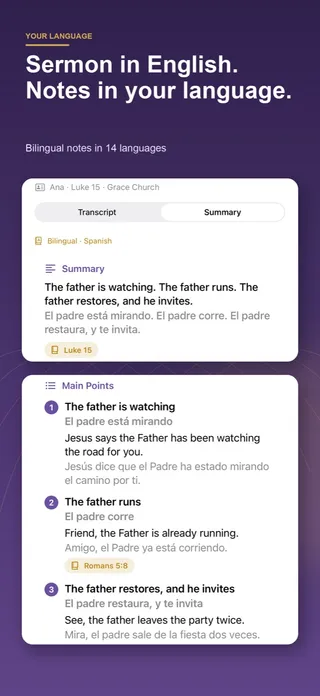
Write what you hear in the sermon’s language, then restate each point in the language you think in, and record Bible references with the book names of both. SermonNote does this for you: choose the sermon’s language and yours, and the summary and main points appear side by side, translated on your device.
Who needs sermon notes in two languages?
More congregations than you might think. A Korean-American family hears an English service on Sunday morning, but the grandparents who join them at lunch think and pray in Korean. A Brazilian student in Lisbon understands the Portuguese sermon perfectly well, yet a Spanish-speaking friend in her small group does not. A Chinese church runs its main service in Mandarin while half the youth group reads English more easily. In each case one message has to travel into a second language before it can be discussed, remembered or prayed over.
Notes in two languages also help people who are learning a language through church. Hearing a sermon in a new language is hard; seeing the same main point restated in a language you already know turns each Sunday into a lesson in vocabulary that matters to you.
How do I do it on paper?
Use two columns. On the left, write what you hear, in the language it is preached in, as fragments. On the right, after each point, restate it in the language you think in. Do not try to translate every word during the sermon; restating the idea is easier and helps you understand it better than a word-for-word copy would.
- Before the service: write the passage with the book name in both languages, because the names differ more than you expect (see the table below).
- During the sermon: fill the left column only. Keep proper names and numbers exactly as you heard them.
- Right after: fill the right column point by point while the message is fresh, and note any term you could not translate under “words to look up.”
- Later in the week: read the passage in a Bible in your own language and correct the right column where the wording of your translation helps.
Free two-language sermon notes sheet
Two columns for the big idea and four main points, a row for Scripture with the book name in both languages, words to look up, this week’s step and a prayer.
Download the PDF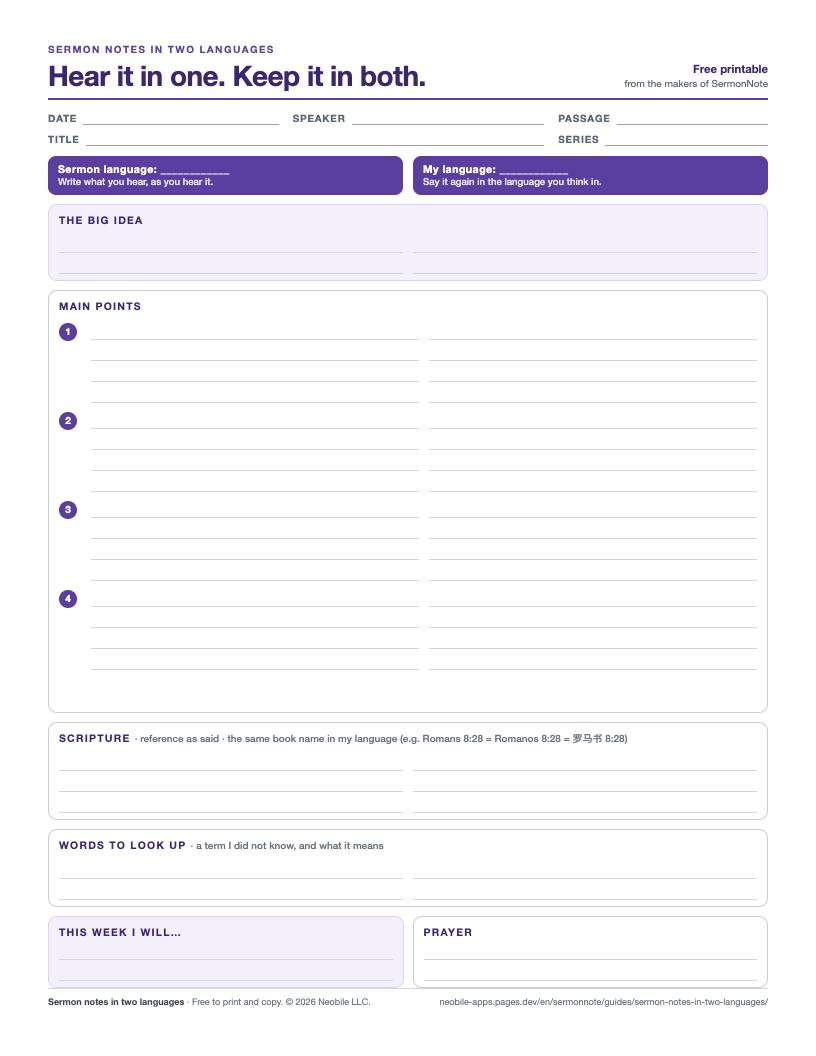
How are Bible books named in each language?
Book names are where bilingual notes most often go wrong: the Gospel of John is “Giăng” in Vietnamese and “Ewangelia Jana” in Polish, and the Psalms are a single book called “Psalm” in German. These are the names SermonNote uses in each of its 15 note languages, with the Bible text the app has built in for that language.
| Language | Romans | John | Psalms | Built-in Bible |
|---|---|---|---|---|
| English | Romans | John | Psalms | World English Bible |
| Spanish | Romanos | Juan | Salmos | Reina-Valera 1909 |
| Portuguese (Brazil) | Romanos | João | Salmos | Bíblia Portuguesa Mundial |
| French | Romains | Jean | Psaumes | Louis Segond 1910 |
| Chinese (Simplified) | 罗马书 | 约翰福音 | 诗篇 | Chinese Union Version |
| Chinese (Traditional) | 羅馬書 | 約翰福音 | 詩篇 | Chinese Union Version |
| Korean | 로마서 | 요한복음 | 시편 | — |
| German | Römer | Johannes | Psalm | — |
| Italian | Romani | Giovanni | Salmi | — |
| Dutch | Romeinen | Johannes | Psalmen | — |
| Polish | List do Rzymian | Ewangelia Jana | Księga Psalmów | — |
| Russian | Римлянам | Иоанна | Псалтирь | — |
| Arabic | رومية | يوحنا | المزامير | — |
| Indonesian | Roma | Yohanes | Mazmur | — |
| Vietnamese | Rô-ma | Giăng | Thi thiên | — |
Languages without a built-in text open the passage on bible.com with one tap. All six built-in texts are public domain, from eBible.org.
How does SermonNote make notes in two languages?
When you first open the app you pick two languages: the one the sermon is preached in and the one you want to read. If the app runs in a language it supports and that language differs from the sermon’s, it is offered as your second one automatically. Both can be changed later in Settings.
Then three things happen, all on the device. First, Apple’s on-device speech recognition writes the transcript in the sermon’s language while you record; the sermon languages you can pick are the ones your iPhone or iPad can transcribe without a server. Second, the notes are written from that transcript in the sermon’s language: a summary, the main points, applications, and any study template you choose. On iOS 26 with Apple Intelligence, Apple’s on-device model writes them; on other devices SermonNote’s own writer, which knows how preachers announce points and applications in each of its 15 languages, builds them from the transcript’s sentences. Third, Apple’s Translation framework puts every summary line and main point into your second language, directly under the original.
Translation needs iOS 18 or later. Before you buy, and again before it translates, SermonNote asks iOS whether this device can translate that particular pair. If a language has to be downloaded first, the notes screen shows a “Prepare language” step; if the pair is not available, you keep your notes in the sermon’s language and nothing pretends otherwise. A translation that did not finish is never saved as if it had.
What makes this different from other AI sermon apps?
Some newer AI sermon apps write notes in many languages, typically in the language of the recording. SermonNote’s focus is the pair: the sermon’s language and yours, shown together, so a bilingual family or a small group can read the same notes. Recording, transcription, notes and translation run on your iPhone or iPad; there is no account, and nothing is uploaded to Neobile.
Tips for better bilingual notes
- Do a one-minute test recording in the sermon’s language before Sunday, so any speech or translation download happens at home.
- Check names, numbers and verse references against what you heard; automatic transcripts can mishear them in any language.
- Keep a short glossary of church words that translate badly, such as “grace,” “fellowship” or “testimony,” and agree on them with your group.
- Follow your church’s recording policy, and keep recordings for your own study.
Sources
Questions people ask
Can an app translate a sermon into my language?
SermonNote translates your notes rather than the live service. You record the sermon in the language it is preached in, and the summary and main points appear side by side in a second language you choose, translated on your device. To hear the sermon interpreted while it is happening, a church needs a live interpretation service.
Which languages can the notes be in?
Fifteen: English, Spanish, French, Portuguese (Brazil), German, Italian, Dutch, Polish, Russian, Korean, Simplified Chinese, Traditional Chinese, Arabic, Indonesian and Vietnamese. Your second language can be any of them except the sermon’s own, so there are always 14 to choose from.
Does the translation happen on my phone?
Yes. SermonNote uses Apple’s Translation framework on iOS 18 or later. The first time you use a language pair, iOS may ask to download that language from Apple; after that, the translation runs on the device and your notes are never sent to a Neobile server.
What if my iPhone cannot translate a language pair?
The app checks the pair first. If the device cannot translate it, bilingual notes are simply not offered for that pair and you still get the notes in the sermon’s language. On iOS 17 the bilingual feature is absent altogether.
Do the Bible verse names change too?
Yes. A reference such as Romans 8:28 is written with the book name each language uses, for example Romanos 8:28 in Spanish or 罗马书 8:28 in Simplified Chinese, so you can find the verse in your own Bible.
Are bilingual notes free?
Bilingual notes are part of SermonNote’s in-app purchase, together with the study templates and full notes for every sermon after your first. The app tells you before you buy whether your device can make the language pair you picked.