Before, during, and after the message
How to take sermon notes: a simple method and a template you can copy
Good sermon notes capture the shape of the message, not every word. Write down the basics before it starts, listen for the big idea, the main points, and the Scripture, then spend ten minutes the same day turning your notes into one clear response for the week.
There is no single right way to take notes. If writing pulls you away from listening, write less, or record the sermon where your church allows it and reflect afterward.
Transcribed on your device · no account
01 / Before the sermon
Why take sermon notes, and how to get ready
Most of us have walked out of church moved by a message and, by Tuesday, struggled to remember what it was about. Notes are a simple way to close that gap. Writing makes you an active listener, gives you something to come back to during the week, and lets you check what you heard against the Bible itself, as the Bereans did when they “received the word with all readiness of mind, and searched the scriptures daily, whether those things were so” (Acts 17:11, KJV).
The goal is not a perfect transcript. Notes are a tool for paying attention and responding, so a few honest lines you actually reread are worth more than pages you never open again. Some people listen better without writing at all, and that is fine too.
A two-minute setup before the message starts
- Write the date, the preacher’s name, and the sermon title or series.
- Open to the main passage if it is announced or printed in the bulletin.
- Put your phone on Do Not Disturb or a Focus if you will use it for notes.
- Pause to pray that you will hear well and respond, not just record.
02 / A template you can copy
A seven-part sermon notes template
You can draw this on a blank page, set it up as a note on your phone, or print it once and reuse it. Leave the most room for main points and your response. If a part is empty on a given Sunday, skip it; the template is a guide for listening, not a form to complete.
- The basics
Date, preacher, main passage, and title or series. This takes seconds and makes your notes easy to find later.
- The big idea
One sentence that captures the whole message. You may only be able to write it near the end, and that is normal.
- Main points
The points in the order they were preached, each in a few words. Many preachers signal them with “first,” “second,” or a repeated phrase.
- Scripture
Every reference mentioned, with the main text first. Mark any you want to reread in context.
- What stayed with me
One illustration, quote, or sentence that stuck. It often becomes the handle you remember the sermon by.
- Questions
Anything you did not understand or want to study further, to look up later or ask about in your small group.
- My response
One specific “This week I will…” step and a short prayer. Keep it small enough to actually do.
If your church prints fill-in-the-blank notes in the bulletin, use them as parts one to four, then add parts five to seven in the margin. Journaling Bibles work the same way: the passage is already on the page, so write the big idea at the top and your response at the bottom.
Prefer a printed page? Download our free printable sermon notes template (PDF), a one-page sheet with a box for each of these seven parts. If you hear sermons in one language and think in another, the guide to sermon notes in two languages has a two-column version.
03 / During the sermon
What to listen for while the preacher is speaking
The hardest part of note-taking is keeping up without losing the thread. These three habits help you stay with the message rather than chasing every sentence.
Listen for the structure
In an expository sermon the points usually follow the passage verse by verse. In a topical sermon, listen for a repeated phrase or question that ties the points together.
Write fragments, not sentences
“God works all things for good → those who love him” is enough. Use arrows, a star for key ideas, and a question mark for things to revisit.
Look up often
If you miss a line, let it go and keep listening. Write just the book and chapter of a verse you did not catch, and find it later.
Pay special attention to the end of the sermon. Preachers often restate the big idea and give a specific call to respond in the last few minutes, which is exactly what belongs in parts two and seven of your template.
04 / After the sermon
Turn your notes into something you will act on
Notes do their real work after the service. James puts it plainly: “But be ye doers of the word, and not hearers only, deceiving your own selves” (James 1:22, KJV). A short review routine turns what you heard into a next step.
- Sunday, ten minutes
Finish your one-sentence big idea, read the main passage again, and look up any references you marked. Choose one concrete response.
- Midweek, five minutes
Reread your notes and ask how your response is going. Share one point with a friend, your family, or your small group.
- Before next Sunday
If the sermon is part of a series, read ahead in the next passage so you arrive with the context already in mind.
A few minutes with Scripture on the other days of the week makes this review easier. Our guide on how to build a daily Bible reading habit shows a simple way to start.
Questions to ask your notes
- What did this passage show me about God?
- What did it show me about myself?
- Is there something to believe, confess, or give thanks for?
- What will I do differently this week because of it?
05 / Choose your tools
Paper, a notes app, or record and transcribe?
Each method has real strengths. Many people combine them, for example recording the sermon while writing only the big idea and their response by hand.
A notebook or printed template
Quiet, distraction-free, and easy to use in the margin of a Bible. The trade-off is that notes are harder to search later and it is easy to miss what is said while you write.
A notes app
Searchable, backed up with your other notes, and always with you. Typing can pull your eyes down, and notifications can pull your attention away if you do not silence them.
A sermon notes app
You can look up and listen, then read the full transcript and a structured summary later. Automatic transcripts can mishear names and references, so reread the key points yourself.
06 / Recording respectfully
How to record and transcribe a sermon well
Start with your church’s recording policy. Many churches already post sermon audio or video and are happy for members to record the message for personal study, while others prefer that people do not. If you are unsure, ask. Record only the sermon itself, keep the recording for your own study, and do not post or share someone else’s preaching without permission. Leave the phone off during moments like prayer ministry, testimonies, or baptisms unless the church has said otherwise.
Practical tips for a clear transcript
- Do a one-minute test recording at home, in the language you will use, before Sunday.
- Sit where you can hear the preacher or a speaker clearly, away from constant talking.
- Charge your phone, and turn on Do Not Disturb so notifications stay quiet.
- Place the phone face up on the pew, a Bible, or your lap, with the microphone unobstructed.
- Afterward, check names, numbers, and verse references against what you heard.
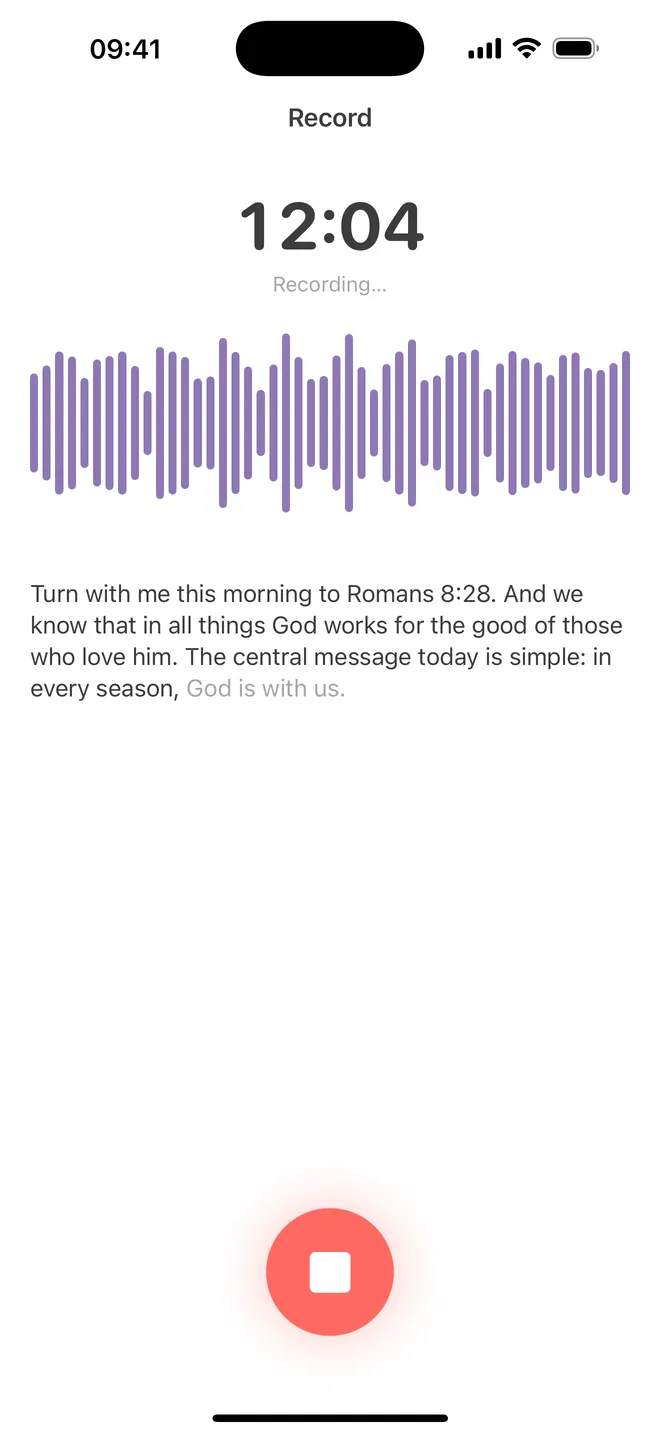
With SermonNote, start recording from the Record screen and put the phone down. Recording keeps going with the screen locked and through phone calls, and a Live Activity on the Lock Screen shows the elapsed time with a Stop button, so you never need to keep the screen on.
Sermon notes, on your device
Record the message and let SermonNote write the first draft
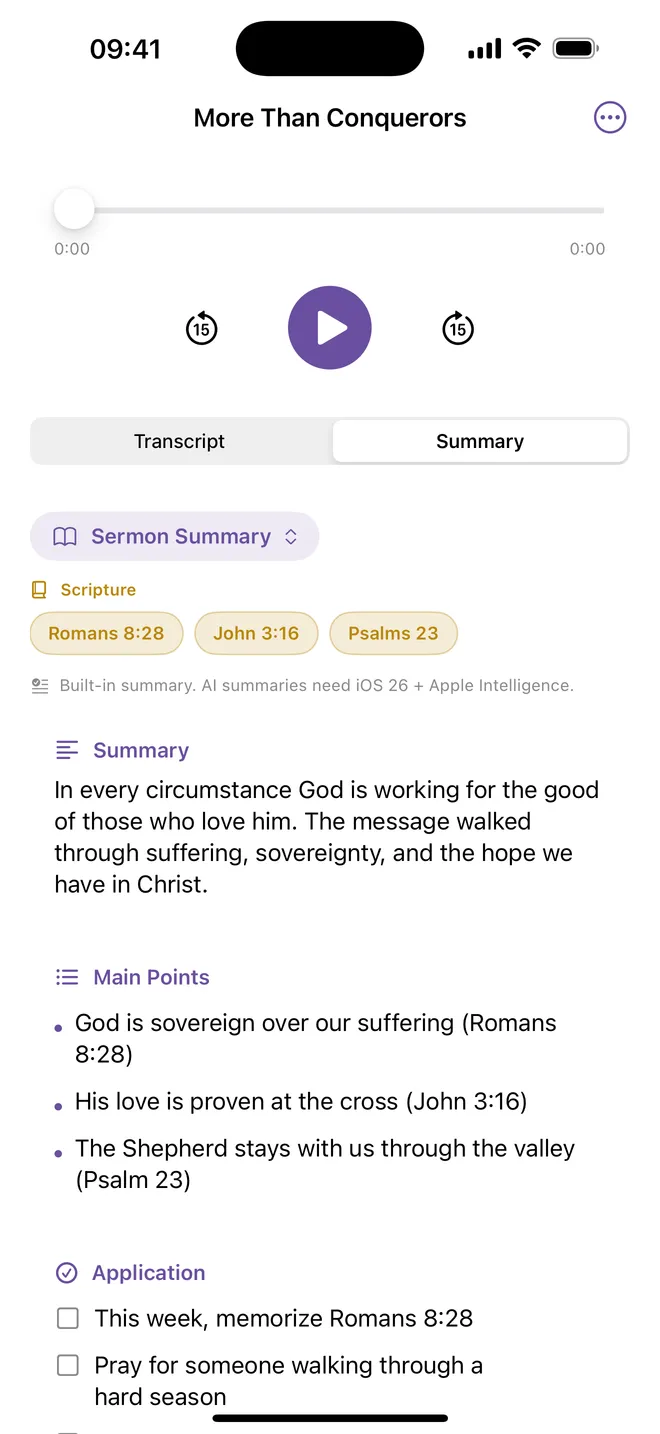
SermonNote is a sermon notes app for iPhone and iPad. Tap record as the sermon begins and a live transcript appears as the preacher speaks, including while the Lock Screen is up. When you stop, SermonNote turns the transcript into notes with the same shape as the template above: a summary, the main points, and applications. Scripture references written in the transcript, such as Romans 8:28, become chips you can tap to read in one of six built-in Bibles. You can also import a sermon from Voice Memos or Files, mark moments, and correct any line of the transcript. If you choose a second language, the summary and every main point appear in both, translated on your device, with verse names in each language.
Everything is processed on your device. Transcription uses Apple’s on-device speech recognition, and your recordings, transcripts, and notes are stored on your iPhone or iPad, never uploaded to Neobile. There is no account, no Neobile server, and no analytics or advertising. On iOS 26 with Apple Intelligence, the notes are written by Apple’s on-device model; on other devices, SermonNote’s built-in writer builds them from the transcript’s own sentences.
SermonNote is free to download. Recording, playback, marks, search, folders, plain-text and Markdown export, and your first sermon’s full notes are included; later sermons show the first two minutes of the transcript and the big idea. An optional in-app purchase adds full notes for every sermon, five study templates (an expository outline, small-group discussion questions, a five-day devotional, prayer points, and a personal reflection), bilingual notes shown side by side in a second language, and PDF export.
- For iPhone and iPad · iOS 17.0 or later
- Live transcript with timestamps, plus audio playback
- Search titles and transcripts; organize a series in folders
- Export as plain text, Markdown, PDF, or subtitles (SRT)
- Optional Sunday reminder and a week-by-week streak
- App available in 15 languages
Transcribed on your device · no account
Bilingual notes need iOS 18 or later. Check automatic notes against the sermon.
Frequently asked questions
Sermon notes FAQ
What should I write down during a sermon?
Start with the date, the preacher, the main passage, and the title. Then listen for the big idea, the main points in order, the Scripture references, one illustration or phrase that stayed with you, any question you want to study, and one way you will respond this week. Short fragments are enough; you can fill in the rest afterward.
Should I take sermon notes on paper or on my phone?
Use whatever keeps you listening. Paper is quiet, has no notifications, and many people remember handwritten notes better. A notes app is searchable and always with you. Recording and transcribing lets you look up at the preacher and still keep every word, but it works best when you add a few thoughts of your own afterward.
Is it okay to record a sermon on my phone?
Follow your church’s recording policy. Many churches already publish sermon audio or video and do not mind members recording for personal study, while others ask people not to record. If you are unsure, ask a pastor or staff member. Record only the sermon, keep it for your own study, and do not post or share someone else’s preaching without permission.
How can I remember a sermon after Sunday?
Spend ten minutes with your notes the same day: write a one-sentence summary, read the main passage again, and choose one specific application. Come back once midweek, or talk it over with a friend or small group. Short, repeated review helps a message stay with you far more than a long set of notes you never reopen.
Does SermonNote send my recording or notes to a server?
No. SermonNote records, transcribes, and writes notes on your device, and it has no account and no Neobile server. Transcription uses Apple’s on-device speech recognition. Summaries use Apple’s on-device model where Apple Intelligence is available and a built-in summarizer elsewhere. Opening a passage uses a built-in Bible, and iOS may download a speech or translation model from Apple the first time you use a language.
What if my iPhone does not support Apple Intelligence?
SermonNote still records, transcribes, finds Scripture references, and writes the notes. Without Apple Intelligence, its own built-in writer makes the summary, main points, applications and the five study templates from the transcript’s sentences. With iOS 26 and Apple Intelligence turned on, Apple’s on-device model writes them instead.
Does SermonNote work on iPad, and which iOS version do I need?
Yes. SermonNote runs on iPhone and iPad with iOS 17.0 or later. Bilingual notes need iOS 18 or later because they use Apple’s Translation framework, and notes written by Apple’s model need iOS 26 with Apple Intelligence.
SermonNote is an independent product of Neobile LLC. It is not affiliated with, authorized by, or endorsed by YouVersion, Bible.com, or Apple. iPhone, iPad, and Apple Intelligence are trademarks of Apple Inc. Other names belong to their respective owners. Scripture quotations are from the King James Version, which is in the public domain. Automatic transcripts and summaries can miss or misstate what was said, so check them against the sermon and the Bible.