
Neobile LLC · iOS 17.0 or later
SermonNote: AI Sermon Notes
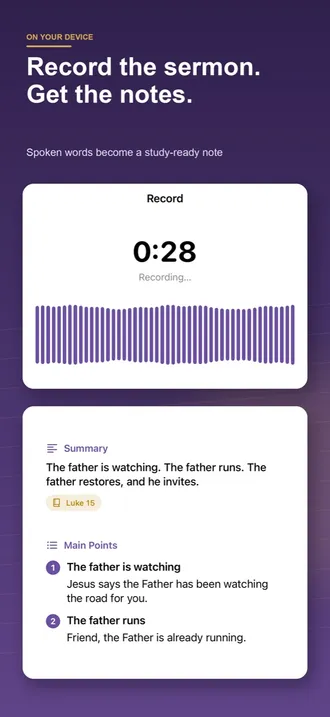
SermonNote records a sermon on iPhone or iPad and turns it into a transcript, summary, main points and applications, with tappable Scripture references. Hear the message in one language and keep notes in two, translated on your device. Free to download; study templates, bilingual notes and full notes after your first sermon need an in-app purchase.
Transcribed on your device · no account
Current version 1.1.1 · October 5, 2026
Inside the app
Who is it for?
- Churchgoers who want Sunday’s message to stay with them all week
- Bilingual and diaspora congregations: the sermon in one language, notes read in another
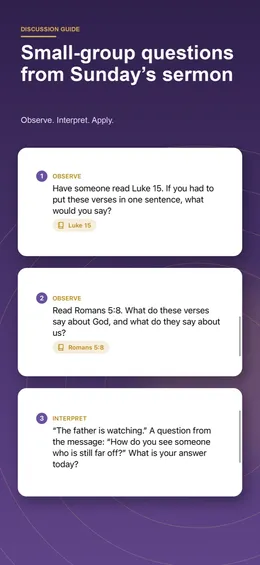
- Small-group leaders who need discussion questions by midweek
- Anyone who wants searchable sermon transcripts without an account or a cloud service
What does it do?
From sermon to notes
- A live transcript scrolls as the preacher speaks, and recording keeps going with the screen locked
- Every message becomes a summary, main points and applications
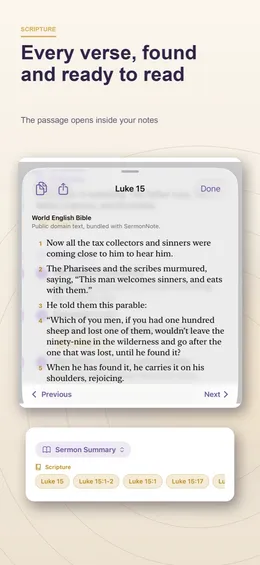
- Scripture references are detected automatically and become tappable chips
- Tap a verse to read the passage in one of six built-in Bibles, with bible.com one tap away
- Import a sermon from Voice Memos or Files
- Mark moments while it is preached and correct any line of the transcript
Study every message
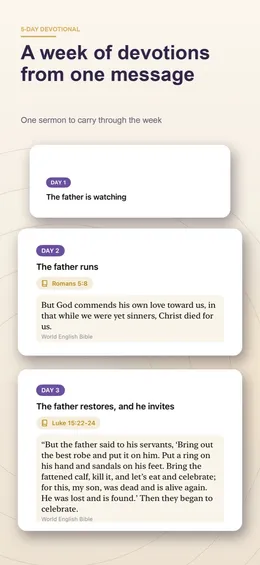
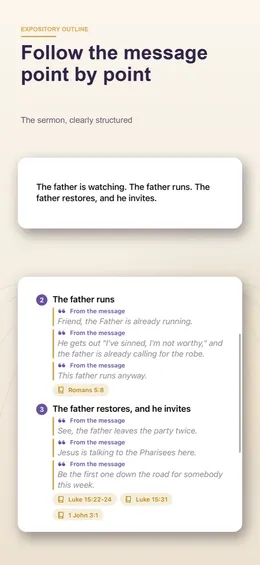
- Expository outline, small-group discussion questions, five-day devotional, prayer points or a personal reflection
- Search every word across all of your notes
- Organize a series with colorful folders
- Export as plain text, Markdown, PDF or subtitles (SRT)
Built for bilingual churches
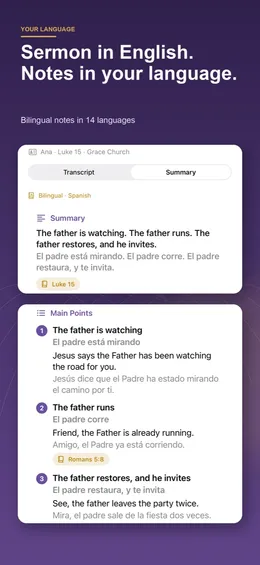
- Choose the sermon’s language and yours once, with 14 languages for your notes
- Read your notes side by side in a second language, translated on your device
- Verse references appear in each language’s own book names
Stay in the habit
- A gentle Sunday reminder and a week-by-week streak
- Share a quote card from the message with your group
What makes it different?
Nothing is uploaded
Recording, transcription and notes run on the device. Transcription uses Apple’s on-device speech recognition; there is no account and no Neobile server, and the App Store privacy label reads “Data Not Collected”.
Notes in two languages
Pick the sermon’s language and your own when you start. The summary and every main point appear in both, translated on the device by Apple’s Translation framework (iOS 18 or later), with verse names in each language.
Six Bibles inside the app
Public-domain texts ship with the app: World English Bible, Reina-Valera 1909, Louis Segond 1910, Bíblia Portuguesa Mundial and the Chinese Union Version in Simplified and Traditional script.
Notes from what was preached
On iOS 26 with Apple Intelligence, Apple’s on-device model writes the notes. On other devices SermonNote’s own writer builds them from the transcript’s sentences, in the sermon’s language.
What is free and what is paid?
Free
- Recording, playback, marks and your sermon library, without limits
- Your first sermon in full: transcript, summary, main points, applications and Scripture chips
- Every later sermon is still transcribed on the device; you see the first two minutes of the transcript and the big idea
- Search, folders, the Sunday reminder, plain-text and Markdown export
- A bundled sample sermon with every study template, to see them before you choose
With an in-app purchase
- Full transcripts and notes for every sermon you record or import
- The study pack: outline, discussion questions, five-day devotional, prayer points and reflection
- Bilingual notes side by side in a second language
- PDF and subtitle (SRT) export
Requirements
- Devices
- iPhone and iPad
- iOS
- 17.0 or later; bilingual notes need iOS 18; notes by Apple’s model need iOS 26 with Apple Intelligence
- Note languages
- English, Spanish, French, Portuguese (Brazil), German, Italian, Dutch, Polish, Russian, Korean, Chinese (Simplified and Traditional), Arabic, Indonesian, Vietnamese
- Account
- None
- Current version
- 1.1.1 · October 5, 2026
SermonNote is an independent product of Neobile LLC and is not affiliated with Bible.com or Apple. Automatic transcripts and notes can mishear names and references; check them against the sermon and the Bible.
Questions people ask
Does SermonNote upload my recordings or notes?
No. Recording, transcription and notes happen on your iPhone or iPad. There is no account, no Neobile server and no analytics. iOS may download a speech or translation language from Apple the first time you use it, and opening a passage on bible.com is your choice.
Can SermonNote translate a sermon into my language?
It translates your notes, not the live service. Choose the sermon’s language and your own when you start: the summary and main points appear in both, side by side, translated on the device. It is not a live interpretation app for hearing the sermon during the service.
Which languages does it support?
Notes can be read in 14 languages besides the sermon’s: English, Spanish, French, Portuguese (Brazil), German, Italian, Dutch, Polish, Russian, Korean, Simplified and Traditional Chinese, Arabic, Indonesian and Vietnamese. Which sermon languages can be transcribed depends on what Apple’s on-device speech recognition supports on your device.
Do I need Apple Intelligence?
No. With iOS 26 and Apple Intelligence on, Apple’s on-device model writes the notes. On any other supported device SermonNote’s built-in writer makes the summary, main points, applications and study templates from the transcript itself.
Does recording continue if my screen locks?
Yes. Recording keeps going with the screen locked and through phone calls, and a Live Activity on the Lock Screen shows the elapsed time with a Stop button.
What can I do without paying?
Record, play back and mark as many sermons as you like, read your first sermon’s full notes, search, use folders and export plain text or Markdown. Later sermons show the first two minutes of the transcript and the big idea; full notes, the study templates, bilingual notes and PDF export need an in-app purchase. People who installed version 1.0 keep every sermon in full.
May I record the sermon at my church?
Follow your church’s recording policy and ask if you are unsure. Record only the sermon, keep it for your own study, and do not share someone else’s preaching without permission.
