
Hair color & makeup try-on
TrueColors: Color Analysis See your colors.
On you.
TrueColors: Color Analysis lets you try hair colors, highlights, ombré, balayage, lipstick and blush on your own photo, with shades picked for your season among the twelve from one daylight selfie. Every photo is analyzed on your iPhone or iPad and never uploaded. Free to download; your season and palette are free; more shades and studios need an in-app purchase.
For iPhone and iPad · iOS 17.0 or later
Your photo stays on your device.
Explore the looks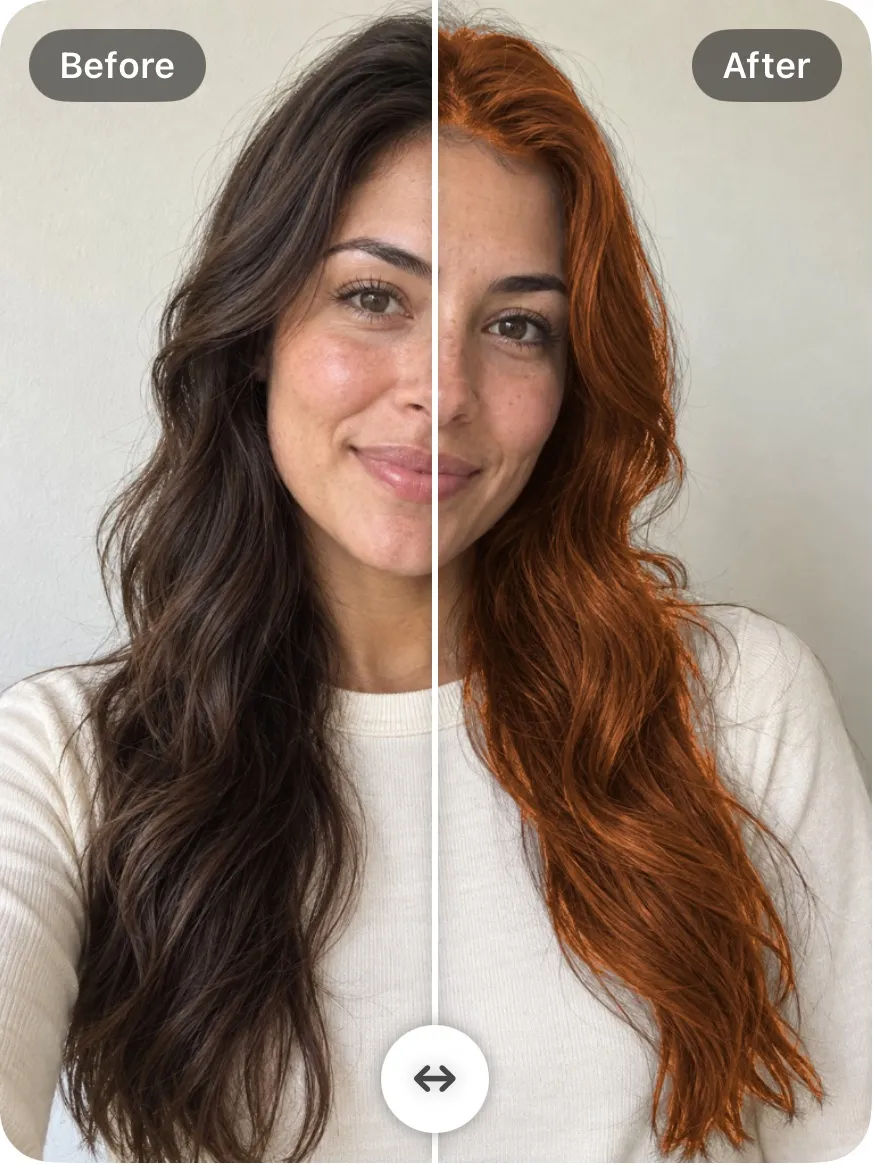
01 / Find your next hair color
A new shade.
A different way to wear it.
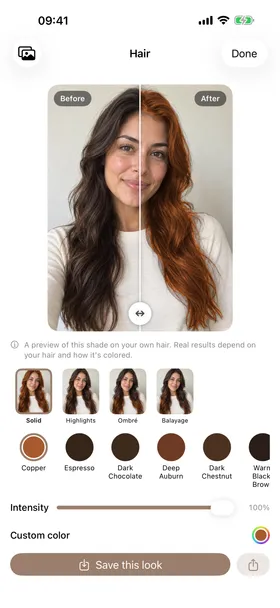
Copper, auburn, espresso—or a color you have in mind. Try a recommended shade on your own hair, then explore Solid, Highlights, Ombré and Balayage.
Keep the same photo as you switch looks. Compare the color against your complexion, adjust intensity, and save the look you want to come back to.
- Recommended shades for your coloring
- Four ways to place the color
- Custom colors and adjustable intensity
- Before-and-after comparison on your own photo
Explore this copper example →
Upload your own photo inside the app.
Free to download and use · Advanced features available with in-app purchases
02 / Put your makeup shades to the test
The lip. The blush.
The whole feeling.
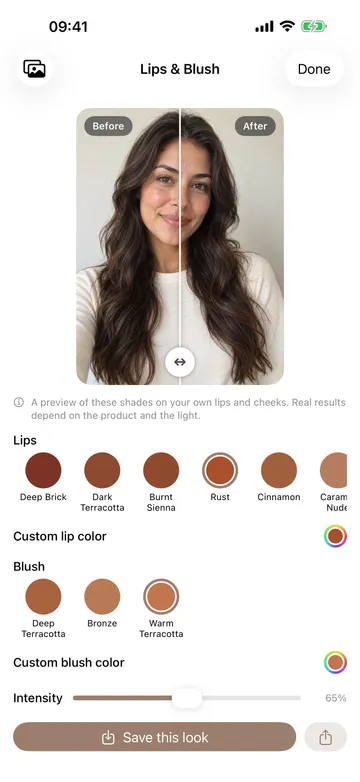
A lipstick swatch looks different once it is on your lips. A blush changes the balance of the whole look. Try both on your own face before choosing your next shade.
Start with lip and blush colors recommended for your palette. Mix a softer lip with a warmer cheek, try a deeper shade, or choose custom colors and adjust their intensity.
One example pairing from the app. Your recommendations depend on your coloring.
See the shade on your face.
Compare lips and cheeks in one photo, including on deeper skin tones.
03 / A personal starting point
Which colors suit
your skin tone?
Your coloring guides the recommendations. Your own photo helps you make the choice.
TrueColors reads skin, hair and eye tones to suggest a seasonal palette based on undertone, depth and clarity. Use those recommendations to find hair colors, lipstick and blush that work with your complexion.
Then experiment. Try a suggested color, compare it with another shade, and build a look that feels like you. Your palette is a starting point for exploring, with outfit-color previews available when you want to see the complete look.
From photo to possibility
One photo. Plenty of possibilities.
Choose a clear photo.
Face a window in soft daylight, without a color filter. Keep your face and hair visible. For lip and blush previews, use a relaxed mouth and a photo with both eyes in view.
Explore your shades.
Get color recommendations, then open Hair or Lips & Blush. Try a shade on your own photo, switch the color or dye look, and compare before and after.
Save a look you love.
Adjust intensity, combine your hair and makeup choices, and save the preview to Photos. Bring the color idea to your next salon visit or makeup shopping trip.
Who is it for?
- Anyone who wants to know their color season without booking an in-person draping
- People thinking about a new hair color, highlights, ombré or balayage who want to see it first
- Shoppers who want to check a top, dress or scarf against their palette before buying
- Anyone who prefers a color analysis that never uploads their face
What does it do?
The colors that suit you
- Your season in the 12-season system, from a selfie taken in daylight
- Palettes for clothing, hair, makeup, metals and neutrals, plus the colors to avoid
- Why this season: your undertone, depth and clarity, how sure the reading is, and your runner-up season
Hair color and style, before and after
- Your result opens with your own photo in a new hair color chosen for you
- Try every shade of your season, or pick any color you like
- Highlights, ombré and balayage, colored from roots to ends with your shine and texture kept
- Drag the divider to compare, and set the intensity
Lips and blush
- Your season’s lip and blush shades on your own face
- A natural finish: lip lines and gloss stay, blush is a soft flush on the cheeks
Draping
- What you are wearing, recolored in the colors of your palette
- Your season next to other seasons, side by side
Your whole look and your clothes
- Hair, lips, blush and draping together on one photo of you; save it or share the before and after
- Photograph a top, a dress or a scarf and see how well its color suits you, with the closest colors from your palette
And more
- Your analyses stay on your device, to open again anytime
- Share your palette card
- Available in 18 languages
What makes it different?
Nothing is uploaded
Every photo is analyzed on your iPhone or iPad. There is no account and no sign-in, it works without an internet connection, and the App Store privacy label reads Data Not Collected.
It shows its reasoning
The result names your undertone, depth and clarity, says how sure the reading is and gives a runner-up season, instead of a bare label.
Try-on in the same app as the analysis
Hair color with highlights, ombré and balayage, lips, blush and draping all run on the same photo the season was read from.
Your season against the others
Draping puts your season next to other seasons on the same face, so you can see the difference rather than take it on trust.
What is free and what is paid?
Free
- Your season, core palette and clothing palette
- Why this season: undertone, depth, clarity, how sure it is and your runner-up
- One hair color chosen for you, at full quality, with intensity, save and share
- Draping your season against its opposite on the wheel
- Your season’s signature lip shade and one blush shade
- Five clothes checks with the full verdict; history and the palette card
With an in-app purchase
- Every hair shade of your season, and any color you pick
- Highlights, ombré and balayage on your own hair
- Any season or palette color draped on you, several compared
- All lip and blush shades
- Unlimited clothes checks
- The makeup, metals and neutrals palettes and the colors to avoid
Requirements
- Devices
- iPhone and iPad
- iOS
- iOS 17.0 or later
- Languages
- 18: Arabic, Chinese (Simplified and Traditional), Dutch, English, French, German, Indonesian, Italian, Japanese, Korean, Polish, Portuguese, Russian, Spanish, Thai, Turkish, Vietnamese
- Internet
- Not needed; no account
- Photo
- One selfie in daylight, facing a window
- Current version
- 2.0 · October 5, 2026
Your next look starts here
Try the color
before you commit.
Hair, lips and cheeks. Your photo. Your possibilities.
On-device analysis and previews · no account needed
A few things to know
Hair color & makeup try-on FAQ
Can I try a different hair color on my own photo?
Yes. Choose a selfie or take a photo, then open the hair studio. Your result opens with a new hair color chosen for you; preview the other shades of your season or a custom color in Solid, Highlights, Ombré or Balayage, colored from roots to ends with your shine and texture kept. Drag the divider to compare before and after, and set the intensity.
Can I try lipstick and blush together?
Yes. The Lips & Blush studio lets you select a lip shade and a blush shade, preview them on your face, and adjust intensity. Your lip lines and gloss stay, and blush is a soft flush on the cheeks. You can start with your recommended colors or explore custom shades.
How does TrueColors recommend colors for my skin tone?
It reads your skin, hair and eye colors from the real regions of your photo, places you by undertone, depth and clarity, and gives you the nearest of the twelve seasons, with how sure the reading is and your runner-up season. That palette is the starting point for hair, lips, blush and clothing colors, which you then see on your own photo.
Do I need to know my color season before I start?
No. Start with a selfie in daylight, facing a window, without a filter. TrueColors finds your season and brings you into the try-on. If the photo was taken in warm or cool light, the result says so and suggests a retake; it never blocks the result.
Are my selfies uploaded?
No. Analysis and try-ons run on your iPhone or iPad, and your photo is never sent to a server. There is no account or sign-in, the app works without an internet connection, and the App Store privacy label reads Data Not Collected.
Is TrueColors free?
It is free to download. Your season, core and clothing palettes, the explanation of your result, one hair color chosen for you, draping against your opposite season, one lip and one blush shade and five clothes checks are free. More shades, the hair looks, any-season draping, unlimited checks and the remaining palettes need an in-app purchase.
Will hair dye or makeup look exactly like the preview?
The previews help you compare color ideas. A finished hair color also depends on your starting hair color, dye and salon technique; makeup depends on the product, application and light. Use the preview as a reference when choosing a shade.
Does it work on iPad, and in which languages?
It runs on iPhone and iPad with iOS 17.0 or later and is available in 18 languages, including English, Spanish, French, German, Japanese, Korean, Chinese and Arabic.
Examples shown are actual app previews. For the best color recommendations, use soft daylight and avoid filters. Preview results vary with the photo, the starting hair color and the products you use.
Read the photo try-on guide

